How to Save and Share Places for a Trip
Stop losing restaurant tips in screenshots. A simple system to collect the places you want to visit, organise them by city and share them with friends.
Tips arrive everywhere: friends' messages, videos, articles. Without a system they're gone when you need them.
Collect in one place
Pick one app and save every place there, the moment you hear about it.
Organise by city
Group places by city so you see what's near your stops when you plan each day.
Add a short note
Why did you save it? 'Best coffee, go early' is more useful than a pin alone.
Share with your group
Shared places let everyone see the options and add their own.
Bring in what you already saved
On Maapzy you can save recommendations by city, see them on the globe, and import places you saved in Google Maps.
What makes a saved place useful
A pin on its own tells you little a month later. The most useful saved places have three things: the name, the city, and a short reason. 'Small bakery, try the cardamom bun' is enough to decide whether to go. If someone recommended it, note who, so you can ask them more.
Sort before the trip, not during
A week before you leave, go through your saved places for each city. Remove the ones that no longer appeal, and mark two or three you really want to visit. During the trip you then only look at a short list, not fifty pins.
Keep them after the trip
Your saved places become your own guide when friends ask for tips later. On Maapzy, recommendations you add stay on your profile by city, so sharing them is a single link instead of a long message.
How Maapzy helps
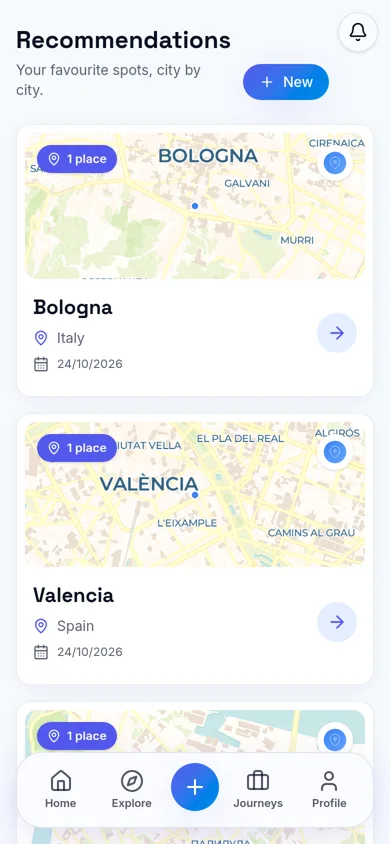
In Maapzy you save recommendations by city: restaurants, cafés, viewpoints and anything worth a visit, each with its location on a map. Your places appear on the globe, and friends who follow you can see them, which turns your tips into a personal city guide you can share.
Start your next trip on a map.
Pin a few cities and see what a realistic route looks like — in five minutes, for free.
Open the plannerKeep reading
- How to Plan a Trip on a 3D Globe (and Why It Helps)Planning on a spinning globe shows real distances, routes and gaps that a list never will. Here's how to use one to plan your next trip, step by step.
- How to Become a Local Guide in Your CityLove showing friends around your city? Here's how to become a local guide: what to offer, how to set a price and how travelers find and contact you.
- How to Export Your Google Maps Saved Places (and Use Them for a Trip)Export your saved places from Google Maps with Google Takeout, then import them into a trip planner so they sit on your map next to your route.