How to Plan a Trip: A Simple Step-by-Step Guide
From picking a destination to packing your bag, a clear, no-stress way to plan any trip in eight simple steps, whether it's a weekend or a long holiday.
Planning a trip can feel like a hundred open tabs at once. It doesn't have to. Most good trips come together by answering a few questions in the right order. Here's the order we use.
1. Decide why you're going
Rest, adventure, food, culture, seeing friends? Your reason shapes everything else. A beach week and a five-city tour need very different plans, so write down in one sentence what you want from the trip.
2. Set your dates and budget
Pick how many days you have and a rough total budget. Split it into four buckets: transport, places to stay, food, and activities. Leave about 10% extra for surprises.
3. Choose where to go
If you're not sure, browse ideas first. Check the season: weather, holidays and crowds can change a place completely. Maapzy's Discover tab shows top destinations and under-the-radar places with the best time to visit each one.
4. Pin your stops on a map
This is the step most people skip, and it's the one that saves the most time. Put every city or place you'd like to see on a map. You'll see straight away what's close together, what's too far, and which order makes sense.
5. Build a realistic route
A good rule: two to three nights per stop. Fewer and you spend your trip packing; more and you can slow down. Cut stops that need a long detour — you can save them for next time.
6. Book the big things first
- Flights or long train rides
- Places to stay, especially in busy seasons
- Anything with limited tickets, like popular museums or tours
Leave the rest open. Some of the best moments come from things you didn't plan.
7. Sort out the practical stuff
- Passport valid for at least six months, and any visas you need
- Travel insurance
- Bank cards that work abroad
- Offline maps and copies of your bookings
8. Share the plan
Send your route to the people you're traveling with, or family back home. In Maapzy you can add travelers to a journey so everyone sees the same plan, and ask local guides for tips about the places you're visiting.
How Maapzy helps
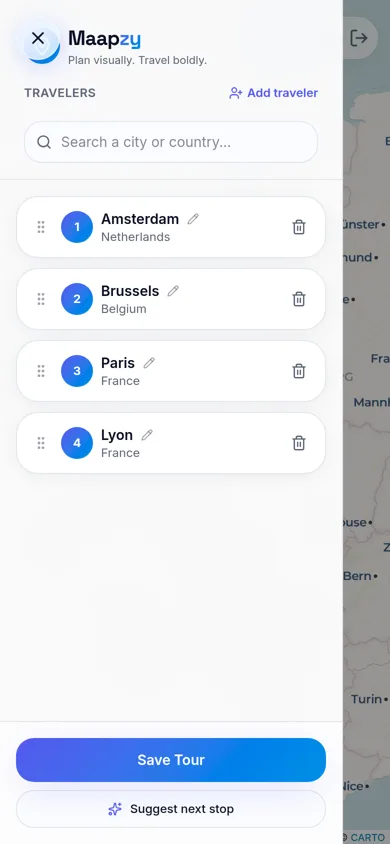
In the Maapzy planner you add cities as numbered stops and see them connected on a map. Drag stops to change the order, rename them, or ask for a suggested next stop. Seeing the route makes it obvious when a day is too full or a transfer too long. Save it as a journey and share it with the people coming along.
Plan your trip on Maapzy
Maapzy puts all of this in one place: pin your stops, build your route, add your travelers and share a poster of your trip when you're back. It's free on the web and on Android.
Start your next trip on a map.
Pin a few cities and see what a realistic route looks like — in five minutes, for free.
Open the plannerKeep reading
- How to Plan a Trip on a 3D Globe (and Why It Helps)Planning on a spinning globe shows real distances, routes and gaps that a list never will. Here's how to use one to plan your next trip, step by step.
- How to Become a Local Guide in Your CityLove showing friends around your city? Here's how to become a local guide: what to offer, how to set a price and how travelers find and contact you.
- How to Export Your Google Maps Saved Places (and Use Them for a Trip)Export your saved places from Google Maps with Google Takeout, then import them into a trip planner so they sit on your map next to your route.