How to Create a Travel Itinerary That Actually Works
Build a realistic day-by-day travel itinerary with anchor stops, honest travel times and room for the unexpected, so your trip never feels rushed.
A good itinerary is a guide, not a timetable. It tells you where to be each day and what matters most, while leaving space to change plans.
1. Start with the route
Put your stops on a map first. Seeing distances makes it obvious when a plan is too ambitious.
2. Pick one or two anchors per day
Choose the things you would be disappointed to miss. Build the rest of the day around them.
3. Count travel time honestly
Moving between cities usually takes half a day once you include packing, transfers and check-in.
4. Group places by area
Visiting neighbouring sights on the same day saves hours of back-and-forth.
5. Leave buffer time
Keep at least one loose block every day for rest, detours or bad weather.
Try it in the Maapzy itinerary maker: add stops, reorder them and see the route on a map.
Common itinerary mistakes
- Planning too many cities for the number of days
- Ignoring opening days and reservation requirements
- Putting far-apart sights on the same day
- Leaving no time to eat or rest
Share it early
If you travel with others, share the draft itinerary before it is final. Other people will spot things you missed, like a closed museum or a long transfer, and they are more likely to enjoy a plan they helped shape.
Your itinerary also becomes a record afterwards. A journey saved with its stops shows where you went and in which order, which is useful when you plan a similar trip or when friends ask for advice.
How Maapzy helps
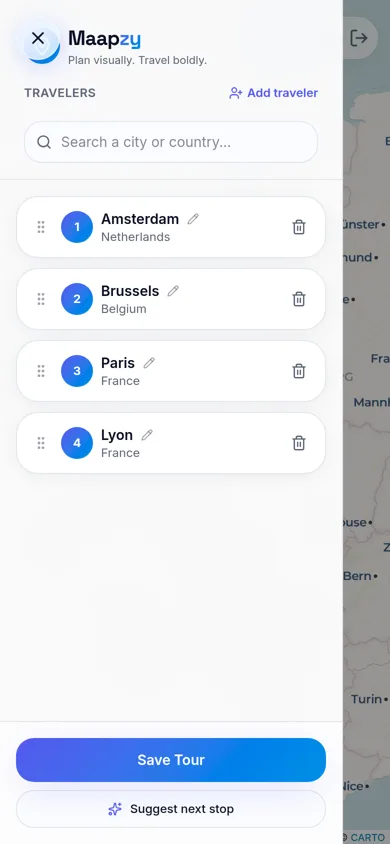
In the Maapzy planner you add cities as numbered stops and see them connected on a map. Drag stops to change the order, rename them, or ask for a suggested next stop. Seeing the route makes it obvious when a day is too full or a transfer too long. Save it as a journey and share it with the people coming along.
Start your next trip on a map.
Pin a few cities and see what a realistic route looks like — in five minutes, for free.
Open the plannerKeep reading
- How to Plan a Trip on a 3D Globe (and Why It Helps)Planning on a spinning globe shows real distances, routes and gaps that a list never will. Here's how to use one to plan your next trip, step by step.
- How to Become a Local Guide in Your CityLove showing friends around your city? Here's how to become a local guide: what to offer, how to set a price and how travelers find and contact you.
- How to Export Your Google Maps Saved Places (and Use Them for a Trip)Export your saved places from Google Maps with Google Takeout, then import them into a trip planner so they sit on your map next to your route.