How to Choose Dates for a Group Holiday (Without Endless Polls)
A simple method to pick holiday dates that work for most of the group, decide fast without endless polls, and keep everyone committed to the trip.
Dates are where most group trips stall. The fix is to limit the options and set a deadline.
Offer two or three windows, not a calendar
Open-ended questions like 'when are you free?' get vague answers. Propose specific windows and ask everyone to mark which ones work.
Set a deadline for answers
Give the group a few days. Whoever hasn't answered by then is planned around, not waited for.
Check the practical side
- Public holidays and school breaks raise prices
- Shoulder season often means fewer crowds
- Long weekends make shorter trips easier to join
Lock it in
As soon as dates are chosen, create the trip and invite everyone. A shared plan turns 'maybe' into a commitment.
When people can only join part of the trip
Sometimes one person can only come for a few days. That's fine: plan a core period when everyone is together, and let people arrive early or stay longer. Put the shared days around the main activity so nobody misses the reason for the trip.
Avoid these date traps
- Waiting for every single person to confirm before deciding
- Choosing dates before checking flight or train prices
- Forgetting time zones or travel days at both ends
- Booking non-refundable stays before everyone has committed
Once dates are fixed, write them in one place everyone sees and stop the discussion there. Reopening the date question later is the fastest way to lose momentum. If the group really can't agree, the organizer picks the window that works for most and moves on.
How Maapzy helps
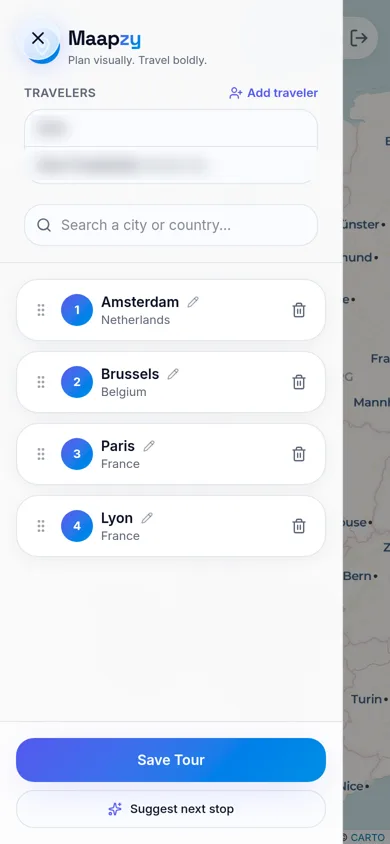
When you create a journey in Maapzy, tap Add traveler and search for friends by name or username. They join the same journey, so everyone sees one route, one list of stops and the same dates, instead of separate versions in a group chat. Changes show up for the whole group, and invited travelers get a notification.
Start your next trip on a map.
Pin a few cities and see what a realistic route looks like — in five minutes, for free.
Open the plannerKeep reading
- How to Share Your Trip Itinerary With Friends and FamilyThe easiest ways to share your trip itinerary: one link with your route and dates, invites for the people coming along, and a simple copy for home.
- Best Travel Planning Apps for Groups: What Actually MattersShared maps, invites and one plan everyone can see. A practical checklist for choosing the right group travel planning app before your next trip.
- How to Organize a Group Vacation: A Step-by-Step PlanFrom the first idea to the last booking: who decides what, and in which order, so your group vacation actually happens and everyone stays happy.