Best Travel Planning Apps for Groups: What Actually Matters
Shared maps, invites and one plan everyone can see. A practical checklist for choosing the right group travel planning app before your next trip.
Most group trips are planned in a chat thread, a spreadsheet and three map links. A good group travel app replaces that mix with one plan the whole group can see. Here is what to compare before you pick one.
Must-haves for group planning
- Invites: friends join the same trip, not a copy of it
- One shared route on a map, with stops in order
- Saved places everyone can add to
- Works on the web and on phones, so nobody is left out
- Easy sharing by link for people who won't install anything
Nice to have
- Recommendations from travelers who have been there
- A way to look back on the trip afterwards
- Budget notes or cost estimates per person
Questions to ask before choosing
Can a friend see the plan without making an account? Can two people edit at once? Does it handle multi-city routes, or only single destinations? Try the app with one real trip before committing the whole group.
Test the app with your group
Before the whole group commits, ask one or two friends to try the app with you on a small plan. Check how easy it is to accept an invite, add a place and see changes made by someone else. If it takes more than a minute to get started, some of your group will give up and go back to the chat.
How Maapzy helps
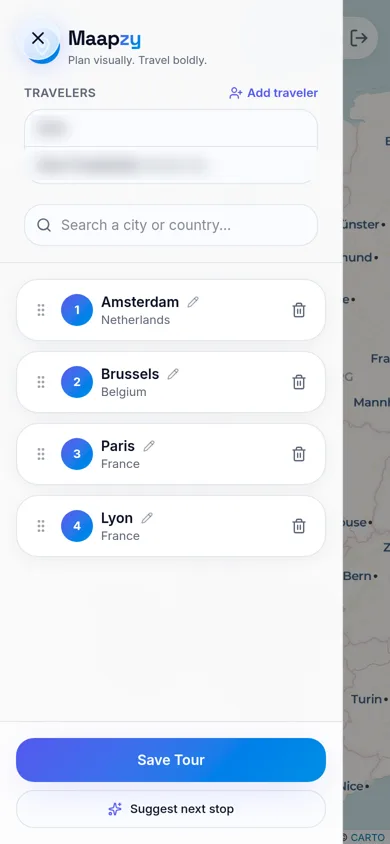
When you create a journey in Maapzy, tap Add traveler and search for friends by name or username. They join the same journey, so everyone sees one route, one list of stops and the same dates, instead of separate versions in a group chat. Changes show up for the whole group, and invited travelers get a notification.
How Maapzy approaches it
Maapzy is built around a shared journey: you add stops on a map, invite travel companions and save places on a globe. It's free to start on the web and on Android.
Start your next trip on a map.
Pin a few cities and see what a realistic route looks like — in five minutes, for free.
Open the plannerKeep reading
- How to Share Your Trip Itinerary With Friends and FamilyThe easiest ways to share your trip itinerary: one link with your route and dates, invites for the people coming along, and a simple copy for home.
- How to Organize a Group Vacation: A Step-by-Step PlanFrom the first idea to the last booking: who decides what, and in which order, so your group vacation actually happens and everyone stays happy.
- How to Choose Dates for a Group Holiday (Without Endless Polls)A simple method to pick holiday dates that work for most of the group, decide fast without endless polls, and keep everyone committed to the trip.